 SplitRight
One order in. The right orders out.
SplitRight splits one order into separate orders by vendor, warehouse or your own rules, so each supplier or location gets only its items. Payments, discounts, shipping and taxes carry over to the cent, and the original is cancelled without a refund, so every sale is counted once.
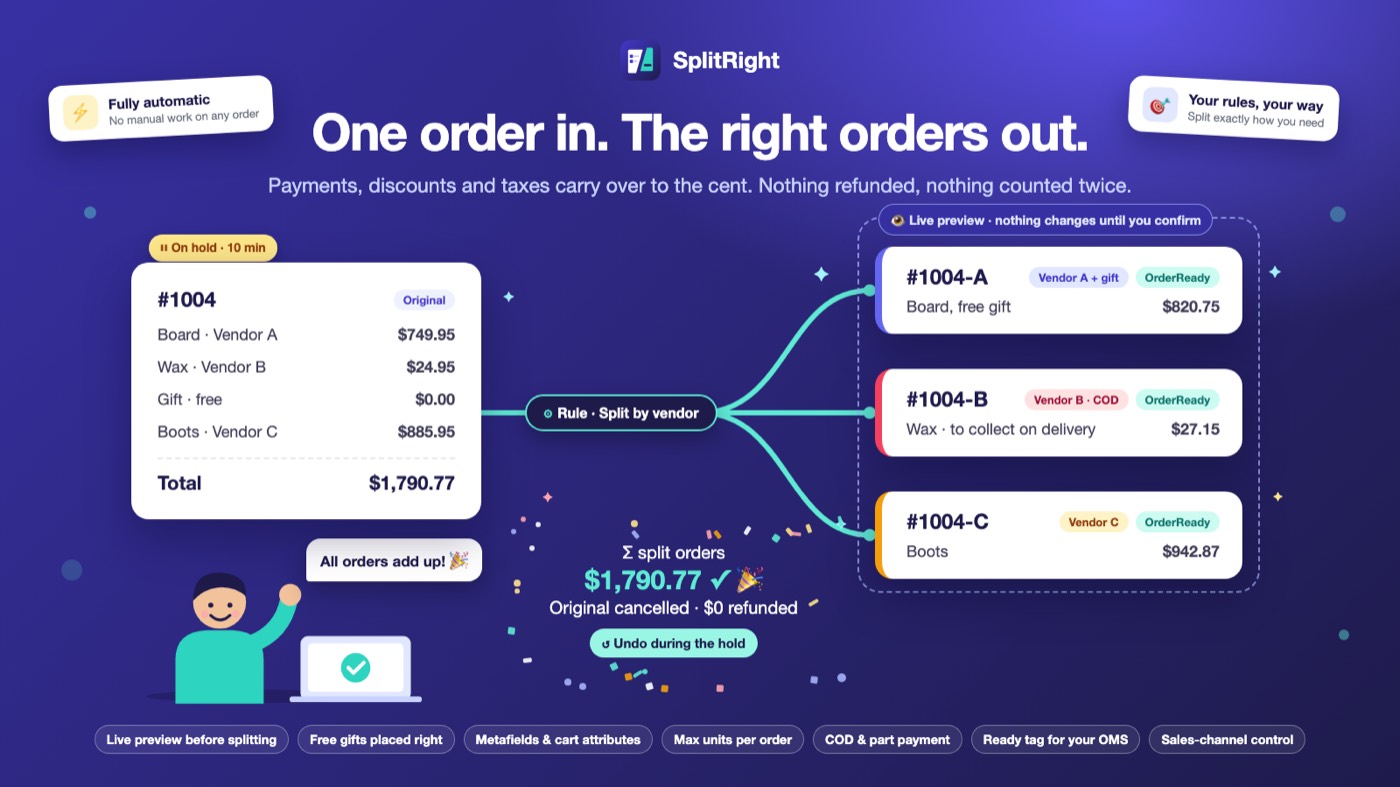
From one order to the right orders, without a double count
SplitRight checks each new order against your rules. Orders that don't need a split are left alone; the rest are split with their money carried over exactly, then the original is closed.
An order comes in
From your online store or any other sales channel you've switched on. SplitRight checks it against your rules as soon as it's created.
It's held while it splits
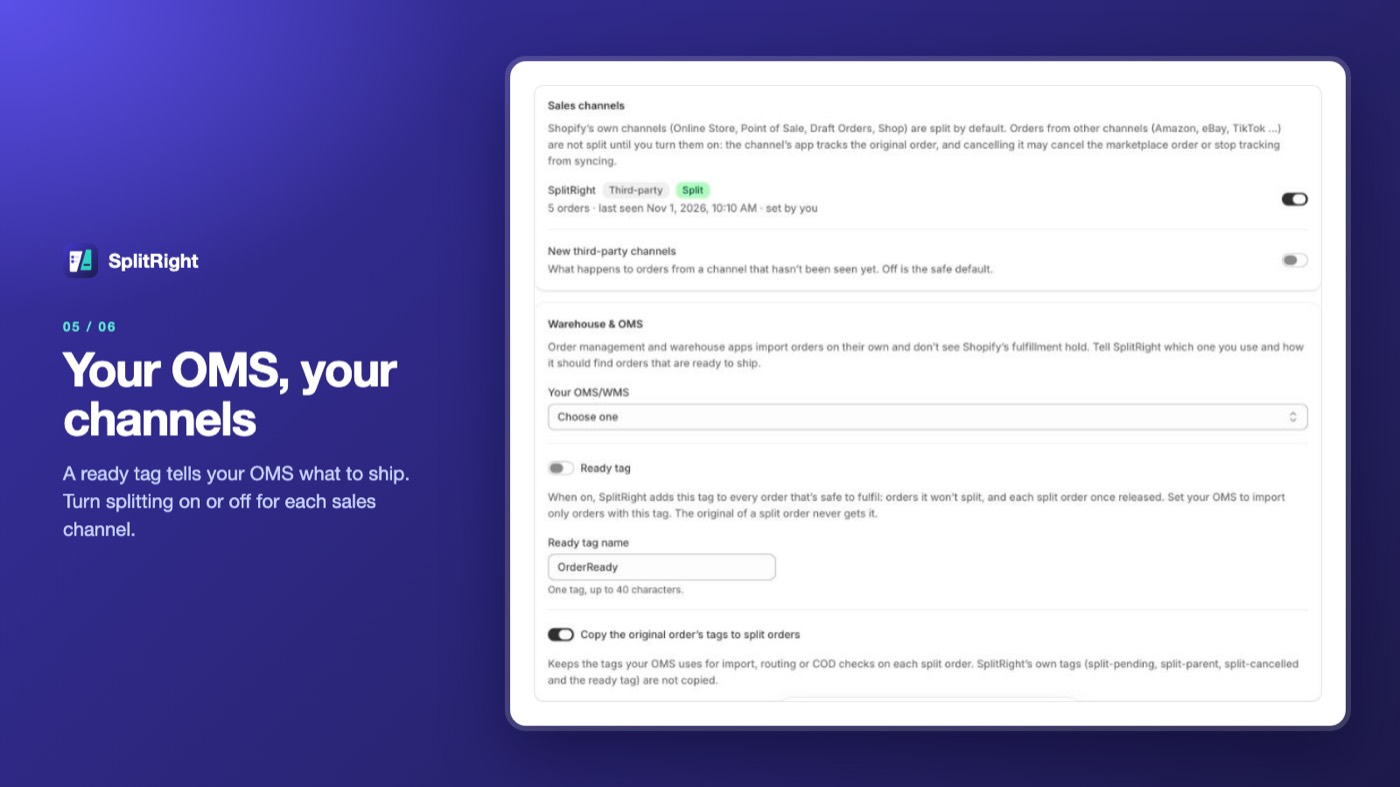
If a rule matches, the order is put on hold and tagged split-pending, so it can't be fulfilled in Shopify in the meantime. If your OMS imports orders on its own, turn on the ready tag.
Split orders are created
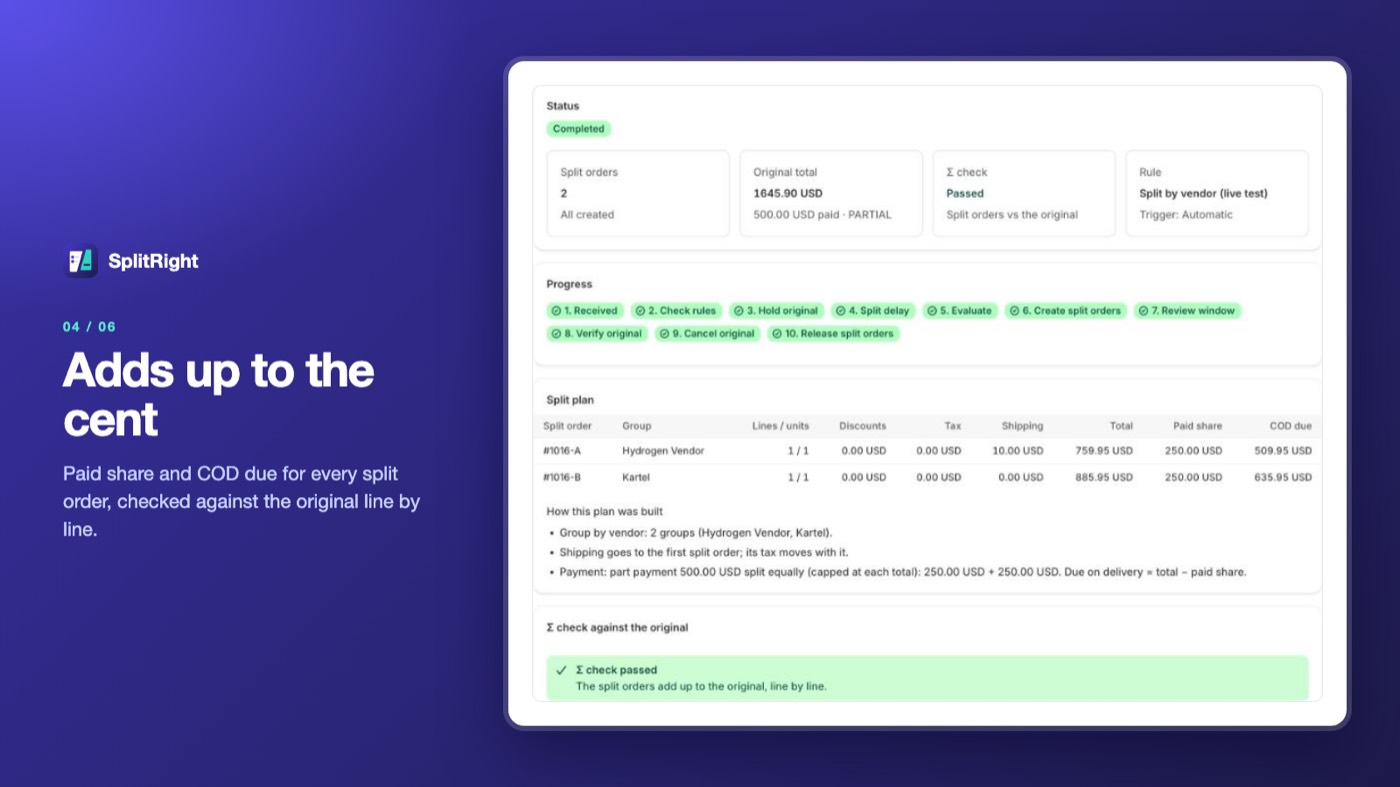
#1004-A, -B and -C, each with its items and its share of the payment, discounts, shipping and taxes. The totals are checked against the original.
The original is closed
After an optional review hold, when you can still undo, the original is cancelled with nothing refunded and the split orders are released to ship.
Splits you can check, to the cent
Rules as simple or as detailed as your store needs, money that always adds up, and a record of every order SplitRight looked at.
Rules
- Split if and Don't split if, combined with AND and OR
- More than 50 fields: vendor, type, SKU, tag, location, weight, price, country, channel and more
- Product, variant and order metafields, cart attributes and line properties (Growth)
- 12 templates to start from
Split by
- Vendor, product type, collection, tag or location
- Matching items against the rest
- Each line on its own order (Basic)
- Bundles kept together
- A maximum number of units per split order (Basic)
Money, to the cent
- Payments, discounts, shipping and taxes carried over
- A Σ check that the split orders add up to the original
- Original cancelled with $0 refunded, so each sale counts once
- Tax-inclusive (GST, VAT) and tax-exclusive stores, any currency
COD and part payment
- COD stays COD on every split order
- Prepaid stays prepaid
- Part-paid orders share the paid amount across the split orders
- Built for India and other COD markets
Free gifts and shipping
- Free and gift products go with the most expensive item, the item that earned them, or the first split order (Growth)
- Shipping charge placed on the split order you choose (Pro)
Preview, hold and undo
- Live preview of any order before it splits (Growth)
- Wait a set number of minutes before splitting (Basic)
- Review hold before the original is cancelled
- Undo during the hold (Pro)
Warehouse and OMS
- Orders waiting to split are held and tagged split-pending
- An optional ready tag, so your OMS imports only split orders
- Choose whether stock comes back when the original is cancelled
Naming and links
- #1004-A / -B / -C, a/b/c or 1/2/3, as prefix or suffix
- Tags on the original and on every split order
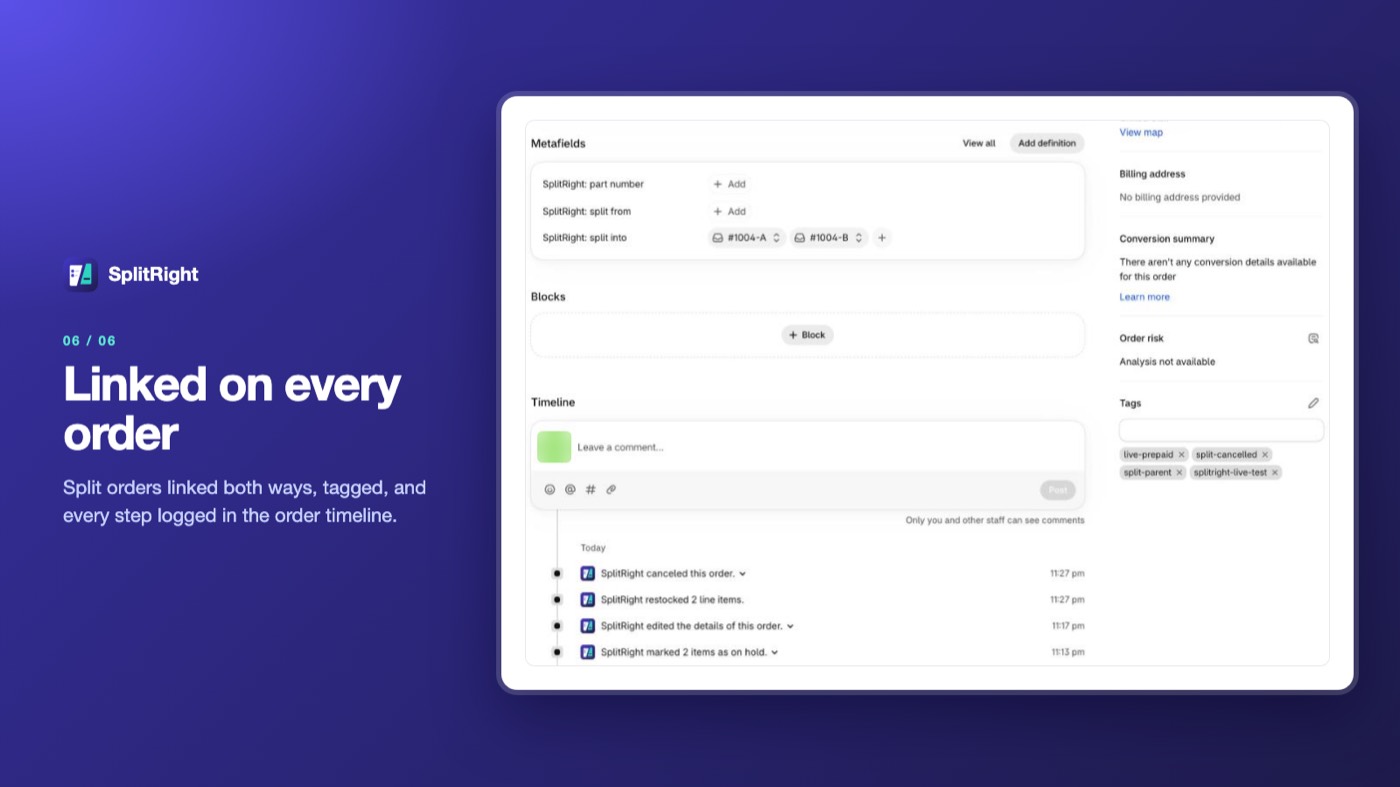
- Original and split orders linked both ways in Shopify
- A SplitRight block on the Shopify order page
Orders and control
- Every order checked, split or skipped, with the reason
- Search, filters and CSV export
- Splitting on or off for each sales channel
- Manual splitting, or automatic from Basic
Every order, and why
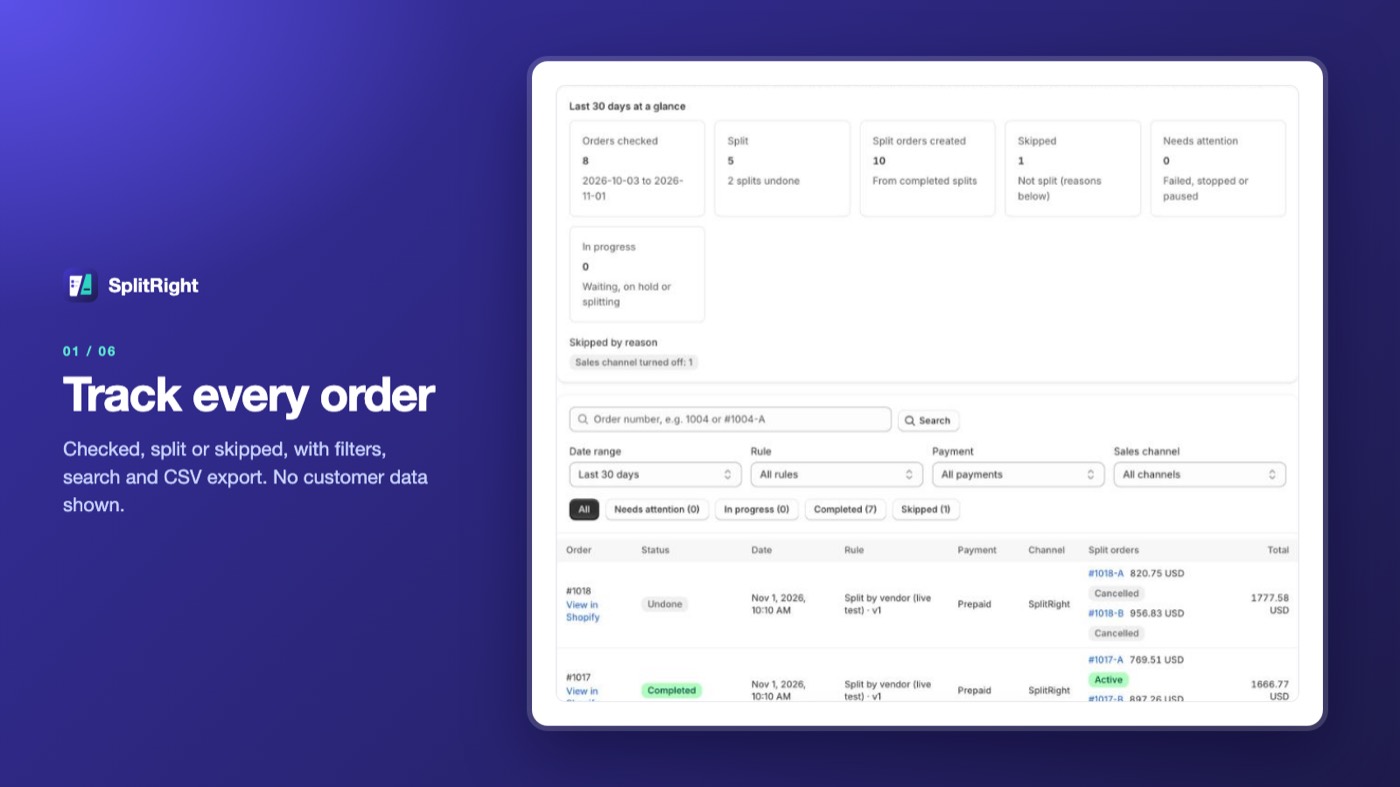
The Orders screen lists every order SplitRight checked: split, skipped or waiting, with the reason, the split orders it created and any cash on delivery still to collect. Search, filter and export to CSV.
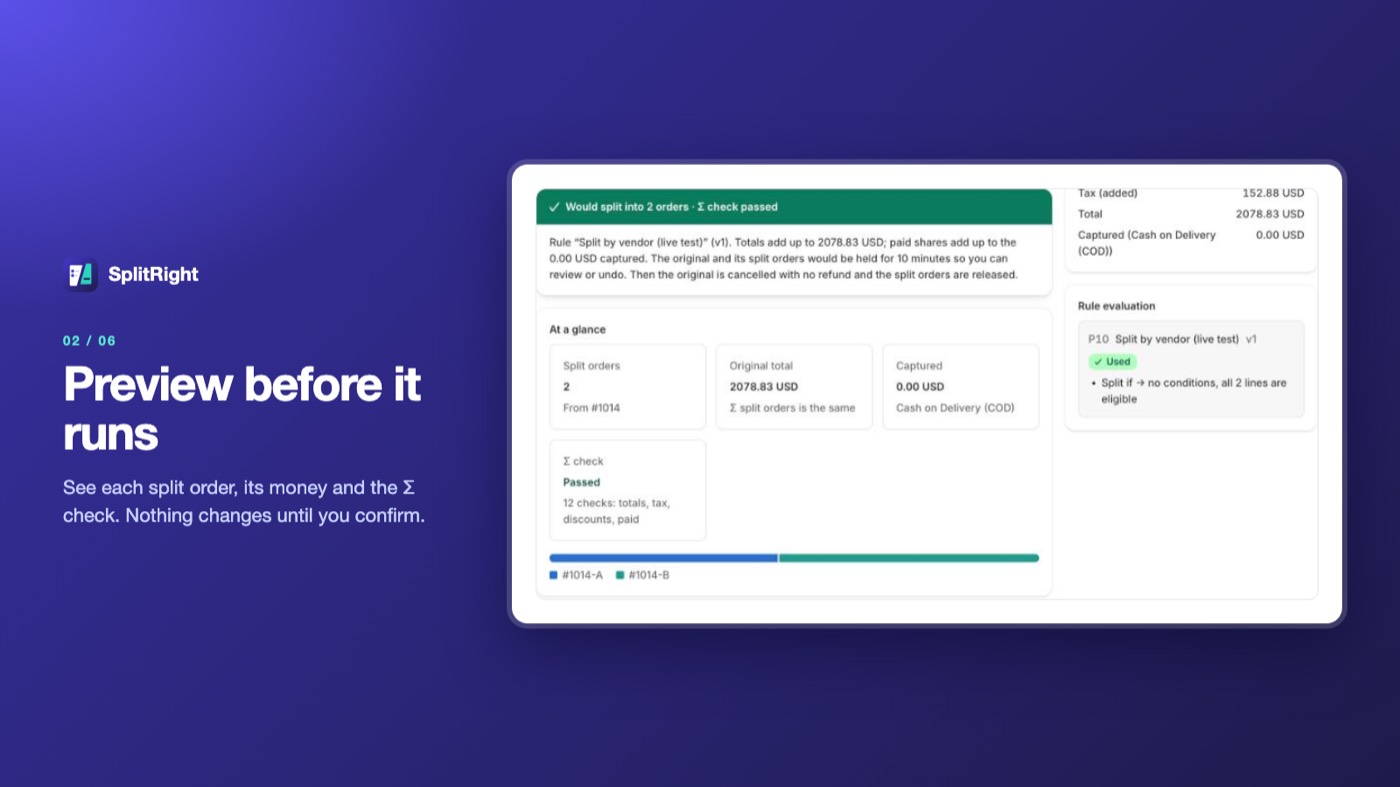
See the split before it runs
Preview any order: the split orders it becomes, what each one is worth and what was paid, and a Σ check that the totals match the original. Nothing changes until you confirm.
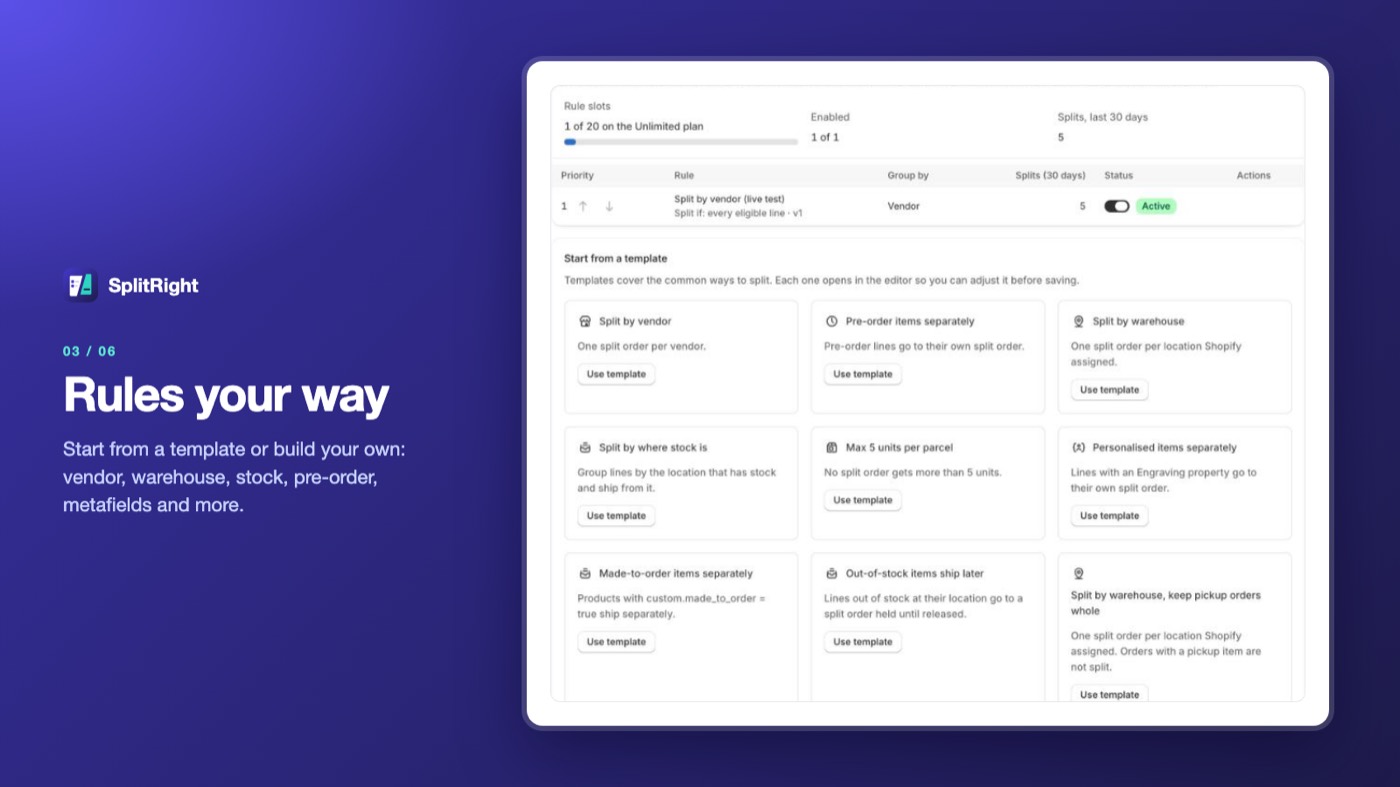
Start from a template
Templates cover the common cases, such as by vendor, by warehouse and by stock. Each rule shows its priority, whether it's on, and how many orders it has split.
Money you can check
Each split order shows its items, its share of what the customer paid and, for cash on delivery, what's still to collect, with a totals check against the original.
Your channels, your warehouse
Choose which sales channels SplitRight splits, and switch on a ready tag so your OMS or WMS imports only orders that are safe to ship.
Linked in Shopify too
On the Shopify order page, the original lists its split orders with a SplitRight log, and each split order points back to the original.
Your first rule in a few minutes
- 1 minute
Install
Start on the Free plan, or try any paid plan free for 14 days.
- A few minutes
Choose a rule
Start from a template such as “Split by vendor”, then adjust its conditions and how split orders are named.
- A few minutes
Tell your warehouse
If an OMS or WMS imports your orders, turn on the ready tag and set it to import only tagged orders. The onboarding shows how.
- When you're ready
Preview, then go automatic
Preview the rule on real orders, split a few by hand, then switch on automatic splitting.
Good to know before you install
- A Shopify store. Orders from the online store and other sales channels can be split; you choose which channels.
- If an OMS, WMS or 3PL imports your orders, set it to import only orders with the ready tag. Most can't skip a tag.
- Orders that are already fulfilled, even in part, are not split.
- Not split in this version: POS orders and B2B orders with payment terms.
Pay for the orders you split
Plans are counted in splits: one original order split successfully. Start free, or try any paid plan free for 14 days. Billed through Shopify; a year costs the price of ten months.
Free
- 25 splits a month
- 1 rule
- Split by hand
- By vendor, type, collection, tag or location
Basic
- 300 splits a month
- 3 rules
- Automatic splitting
- Naming, tags, delay, max units
- Hold, then cancel the original
Growth
- 2,000 splits a month
- 5 rules
- Live preview
- Metafields and cart attributes
- Free-gift placement
Pro
- 10,000 splits a month
- 10 rules
- Undo during the hold
- Shipping placement
- Priority support
| What's included | Free | Basic | Growth | Pro | Unlimited |
|---|---|---|---|---|---|
| Splits a month | 25 | 300 | 2,000 | 10,000 | Unlimited |
| Rules | 1 | 3 | 5 | 10 | 20 |
| Splitting | By hand | Automatic | Automatic | Automatic | Automatic |
| Split by vendor, type, collection, tag or location | Yes | Yes | Yes | Yes | Yes |
| Naming, tags, delay, max units, hold then cancel | — | Yes | Yes | Yes | Yes |
| SKU, price, weight, shipping, channel, payment and customer conditions | — | Yes | Yes | Yes | Yes |
| Metafields, cart attributes and line properties | — | — | Yes | Yes | Yes |
| Live preview and free-gift placement | — | — | Yes | Yes | Yes |
| Undo, shipping placement, stock at location | — | — | — | Yes | Yes |
| Country of origin and HS code conditions | — | — | — | — | Yes |
| Price a month | $0 | $9.99 | $29.99 | $79.99 | $199.99 |
Prices in USD. Over your plan's splits, new splits pause with a banner until next month or an upgrade; no order is dropped. Free on development stores.
Your orders, not your customers' details
To split an order, SplitRight reads it from Shopify and copies the customer's address, email and phone straight into the split orders in your store. It never stores names, emails, phone numbers or addresses in its own database or logs, never shows them on its screens or in its CSV export, and never sends them anywhere else.
What it keeps are order IDs, names, statuses and amounts: 90 days for orders it didn't split, 24 months for split orders, and 13 months of audit log. 48 hours after you uninstall, everything for your store is deleted. Read the privacy policy and terms.
Never counts a sale twice
- Original cancelled with $0 refunded
- Totals, tax, discounts and paid amounts checked before every split
- A failed split can be retried safely
Private by design
- No customer contact details stored
- Every read of contact details is logged
- Error reports stripped of personal data
Shopify-compliant
- Mandatory privacy webhooks honoured
- Shopify managed pricing
- Protected customer data handled to Shopify's requirements
What happens to the original order?
Once the split orders exist, SplitRight cancels the original with nothing refunded. The customer's payment is recorded on the split orders as their shares, so your reports show each sale once.
Will my revenue be counted twice?
No. That is the problem SplitRight was built to avoid. The split orders add up to the original to the cent, and the original is cancelled without a refund.
Does it work with cash on delivery?
Yes. COD stays COD on every split order, with the amount each one still has to collect. Prepaid stays prepaid, and part-paid orders share the paid amount across the split orders.
Which orders does it split?
Only orders that match one of your rules, from sales channels you've switched on. Orders already fulfilled, even in part, POS orders and B2B orders with payment terms are not split.
Can I see a split before it happens?
Yes. Preview any order to see the split orders it would become and the totals check (Growth). You can also split by hand before switching on automatic splitting.
Can I undo a split?
Yes, during the review hold (Pro). Undo cancels the split orders without a refund and restores the original.
How are split orders named?
Like #1004-A, #1004-B and #1004-C by default. You can use a/b/c or 1/2/3 and put the counter before or after the order number.
Does it work with my OMS or 3PL?
Yes, through the ready tag: it marks orders that are safe to ship, including split orders once released. Set your OMS, WMS or 3PL to import only tagged orders.
What am I billed for?
Splits: each original order split successfully, on your Shopify invoice. Orders checked and skipped are not counted.
What customer data do you keep?
No names, emails, phone numbers or addresses. SplitRight keeps order IDs and amounts only. See the privacy policy.
One order in. The right orders out.
SplitRight is launching soon on the Shopify App Store. Ask for early access and we'll help you set up your first rule.