 Kartel: Bundles, Tiers & Gifts
Every discount, shown the way shoppers see it
Tiers, bundles, free gifts, VIP levels and codes: 32 kinds in one app. Choose a discount, answer three questions, watch the shopper's cart update, and turn it on. Shopify applies it at checkout, so the discount shoppers see is the one they pay.
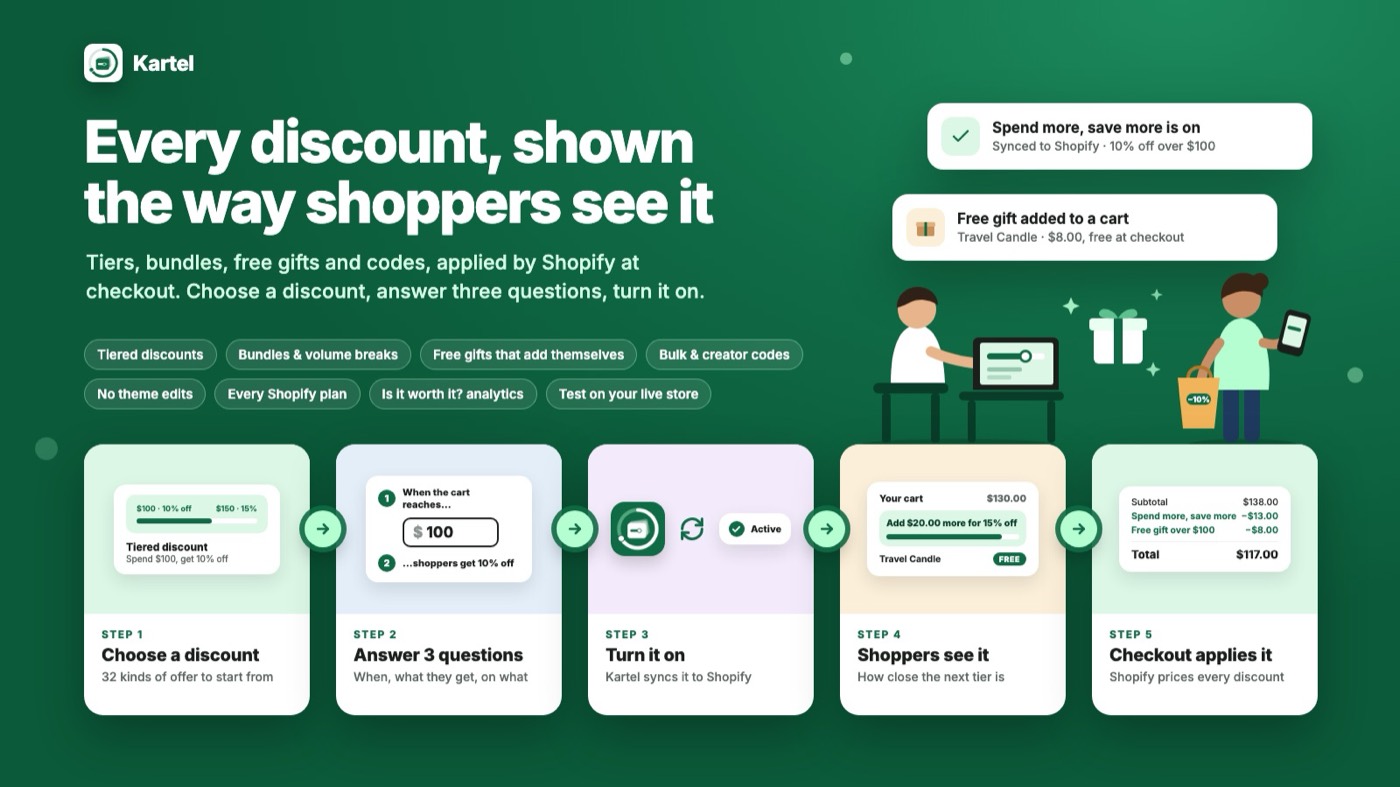
One app instead of three that fight over the cart
Most stores end up with a bundle app, a free-gift app and a code app, each with its own widget, its own rules and its own idea of the cart total. Kartel is one engine for all of them, priced by Shopify's own checkout.
Show, don't tell
Each kind of discount is a moving picture of what the shopper sees, not a rule editor. The form is three questions with one big control each, and the preview is the shopper's real cart, priced by the same function that runs at checkout. A merchant who has never read a help page builds a working discount in under a minute.
32 kinds, one install
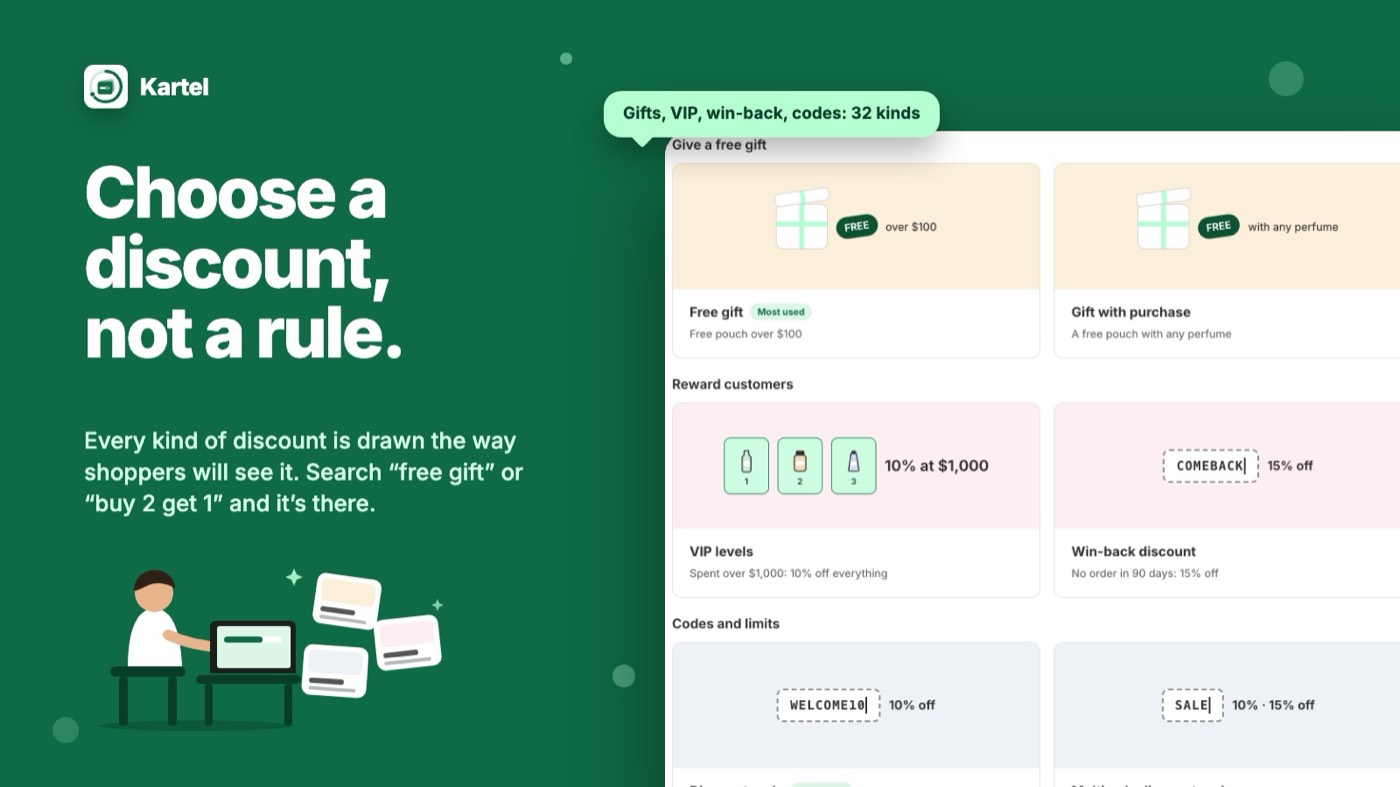
Tiers, volume breaks, four kinds of bundle, five kinds of free gift, VIP, win-back, birthday, codes, budgets and more, in one engine and one price.
Gifts, no theme work
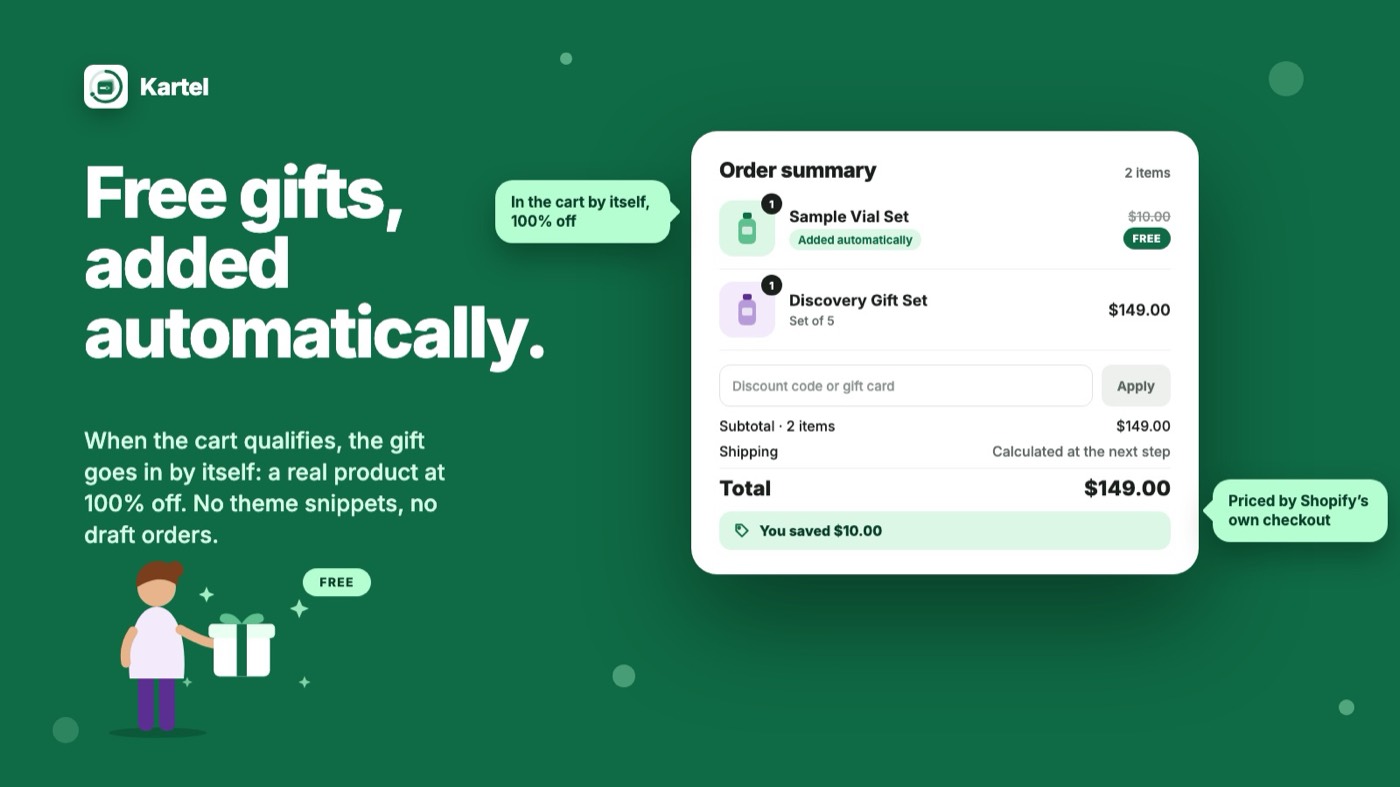
A gift is a real product discounted 100% by the function. The shopper adds it, or Kartel's cart sync adds it, and checkout prices it right either way.
Every plan, every store
Basic, Shopify, Advanced and Plus, in your store's currency.
Live matches saved
Every change ends in a sync. Kartel compares the live discount in Shopify with what you saved and offers "Fix it" when they differ, so drift never shows up as a shopper complaint.
Codes you can account for
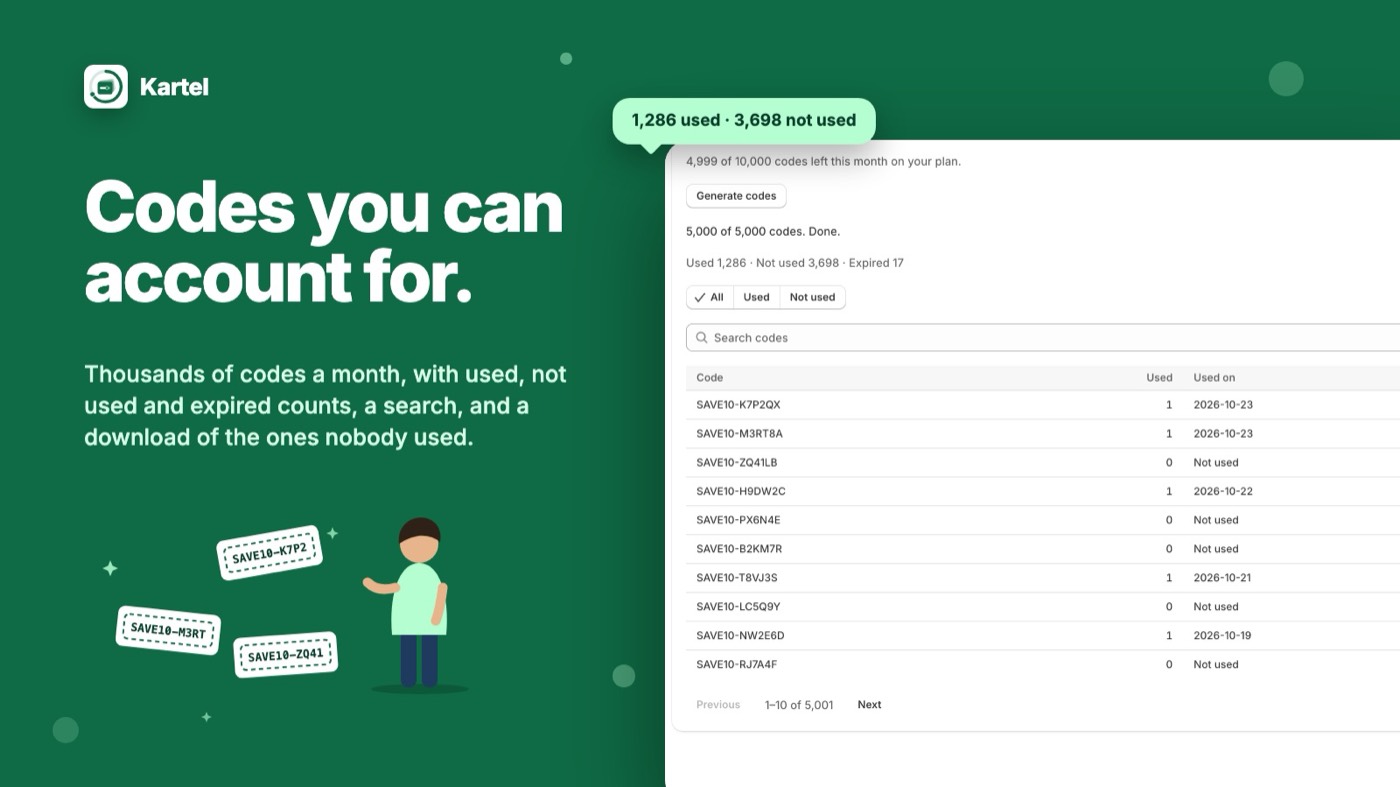
Up to 100,000 bulk codes a month with used, not used and expired counts, a search, a CSV with "used on", and a "download unused codes" button. Each creator gets a capped code of their own; a budget stops a discount once it has given a set amount; first-N-orders caps it. Extra codes are billed, never refused.
Analytics that answer the merchant's question
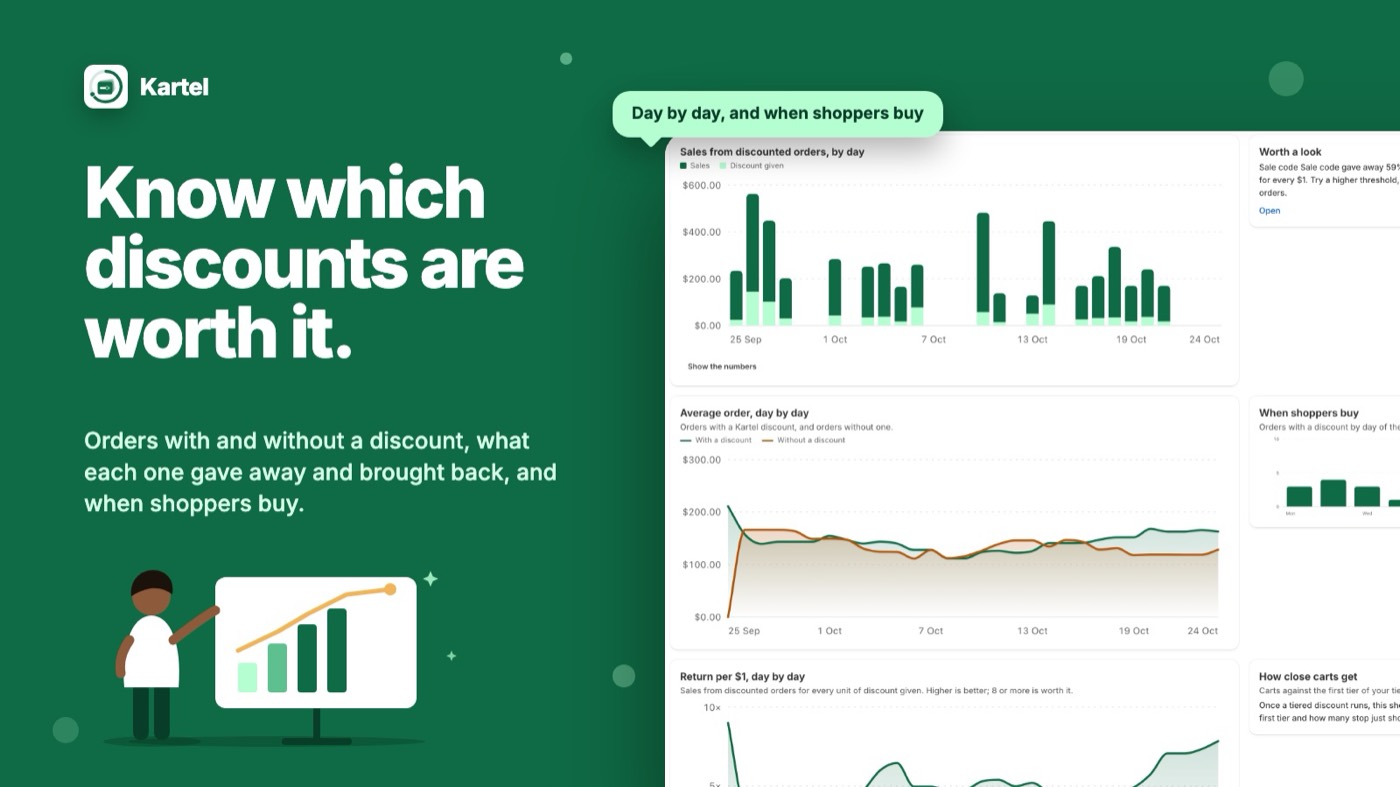
Orders with and without a Kartel discount, items per order and average order value both ways, each discount's return per unit given, results by link source and campaign, A/B tests of two variations, and repeat-customer cohorts. CSV export on every report.
From idea to live offer in a minute
Start from what you want shoppers to do
Spend more, buy more items, bundle deals, free gifts, reward customers, run codes. Each card moves to show the offer in action, so you pick by sight. Search "free gift" or "buy 2 get 1" and it's there.
When, what they get, on what
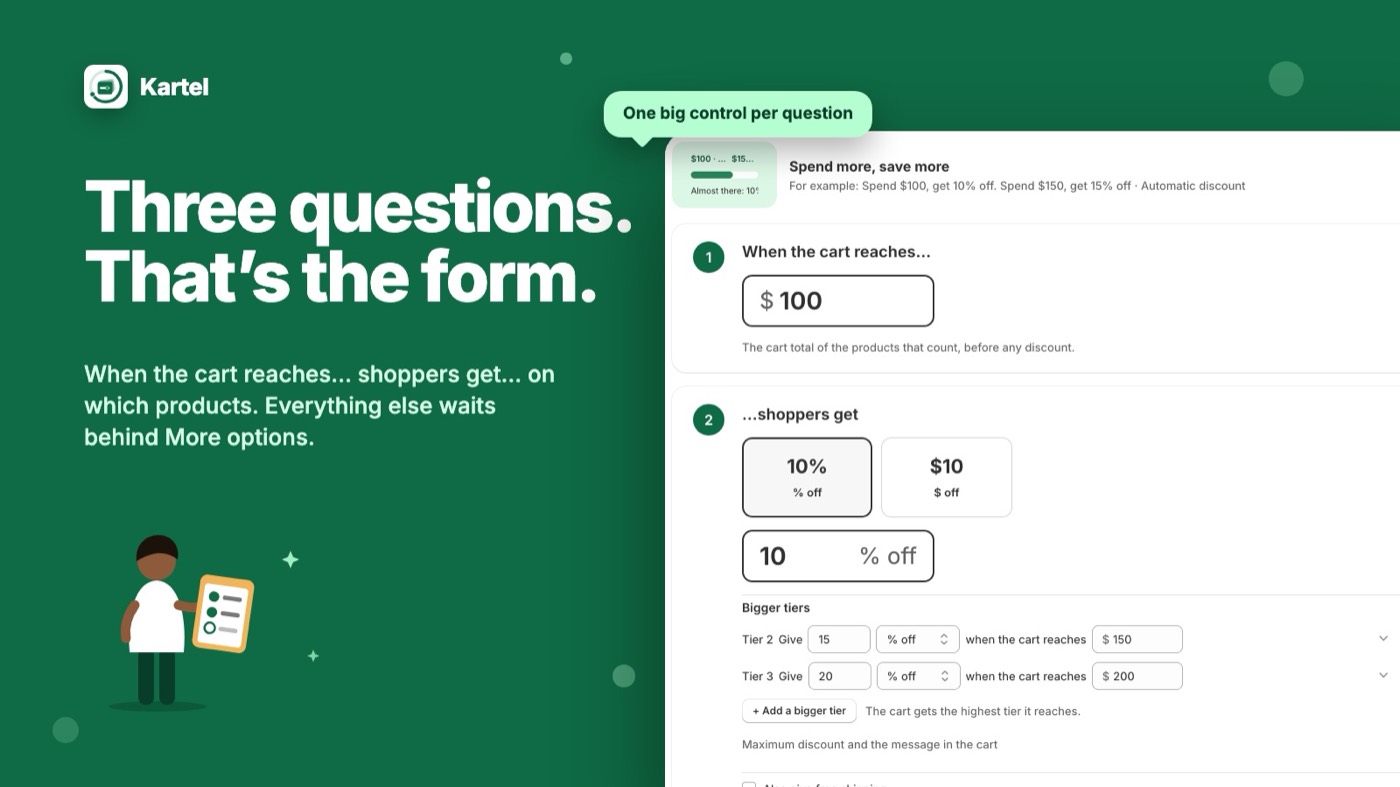
One big control per question: when the cart reaches an amount, shoppers get 10% off, on everything or on a collection. Add conditions if you need them: customer tags, first order, dates, regions, a cap. The shopper's cart beside the form updates as you type.
Test it on your live store first
Preview runs the offer only for you, on a theme you haven't published, priced by the real function. Or open "Try it with a cart" and build any cart to see the price. When you're happy, turn it on; Kartel syncs it to Shopify and checks every 10 minutes that it still matches.
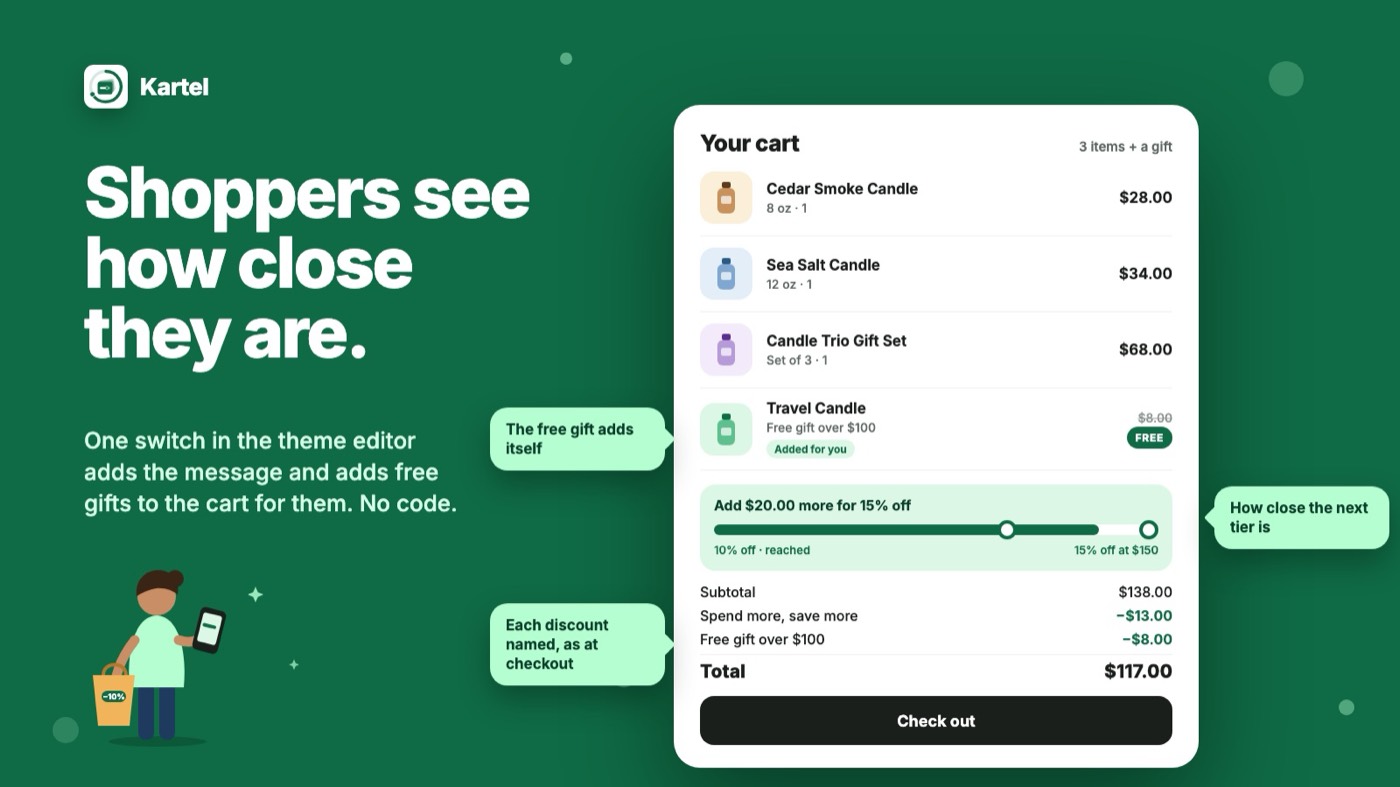
"Add $20 more for 15% off"
- Progress to the next reward in the cart, in your wording
- Free gifts added to the cart for the shopper, or picked by them
- An offer-aware Buy now button
- One switch in the theme editor, no code
See what each offer earns
Each discount gets a verdict: what it returned for every unit of discount it gave. Compare orders with and without a discount, see where carts stopped short of the next tier, and export the rows.
Bulk and creator codes, counted
Generate codes in bulk, see which were used and on which order, download the unused ones, and give each creator a capped code of their own. One code can carry several rules.
Every discount, and every condition it can take
Grouped the way the picker groups them. Each kind is built on Shopify Functions and applied at checkout; the conditions in the last two groups can be added to most of them.
Spend more, save more
Tiers by cart valueTiers by item countMoney off every amount spentVariety bonus (different products)Conditional free shippingBuy more, save more
Quantity breaksCheapest item free or offEvery Nth item offVolume price table on the product pageBundles and deals
Set-price mix-and-match bundles% or money-off bundlesStepped bundlesKits at a fixed priceBuy from A, get from BAdd-on dealSpend on A, save on BFree gifts
Gift when the cart reaches a levelGift with every orderGift with a chosen productShopper picks the giftMystery giftGift with a codeCustomers
VIP levels by lifetime spendFirst order onlyEvery Nth orderBirthday monthWin-back after N daysCustomer tagsCodes
Code-unlocked offersOne code, several rulesBulk code generator with usage countsCreator codes with capsApp-only offersLimits and control
Maximum discount capSkip items already on saleUsage limits per customer and in totalBudget or redemption capFirst N ordersMargin floorPriority between offersWhere and when
Scheduling to the minuteRecurring schedulesRegion or PIN codeMarketLink or campaign (UTM)Vendor, type, tag or price bandScale without surprises. No product-ID lists in the configuration (collections, tags and price bands instead), so a 10,000-product catalogue works; every function is tested on 200-line carts within Shopify's limits; and any storefront step that holds checkout gives up after a timeout and lets the shopper pay.
Installed to first offer in about five minutes
- 1 minute
Install from the Shopify App Store
Kartel opens inside your Shopify admin. The Free plan is selected; no card is needed.
- 2 minutes
Build your first discount
Pick a kind, answer the three questions, preview it on an unpublished theme, turn it on.
- 1 minute, optional
Switch on the cart extras
In the theme editor, under App embeds, turn on "Kartel discounts" to show progress messages and add gifts to the cart for shoppers. Discounts work without it.
- Ongoing
Watch the status
Every offer shows whether it is working. If anything drifts, "Fix it" repairs it. Analytics starts filling in from the first discounted order.
Works with
Every Shopify plan
- Basic, Shopify, Advanced and Plus
- Plus-only extras (same-line stacking) switch off cleanly elsewhere
- Your store's currency; Shopify Markets carts are being finished
Your other tools
- Order tags and note attributes on every discounted order, for your 3PL, ERP or Shopify Flow
- Bundle names written to the order so packing slips make sense
- CSV export of analytics, codes and usage
Shopify's own discounts
- Choose per offer whether it combines with other discounts
- Respects Shopify's 25 automatic discounts per store
- Automatic offers and codes side by side
Start free. Grow into it.
Each plan includes a number of discounted orders a month: orders where at least one Kartel offer applied. Above that, a small per-order charge up to a cap you approve. Shopify bills Kartel with your other Shopify charges.
Free
- 1 offer on at a time
- 50 discounted orders a month
- Tiers, quantity breaks, set-price bundles
- Test mode and cart simulator
- Offer status and sync
Starter
- 5 offers on
- 500 discounted orders, then $0.04 each
- % bundles, spend steps, cheapest item, Nth item
- Free gifts and conditional free shipping
- Customer tags, first order, caps, scheduling
Growth
- 15 offers on
- 2,000 discounted orders, then $0.03 each
- Codes, multi-rule codes, 10,000 bulk codes a month
- Kits, add-on deals, shopper-picks-the-gift
- VIP levels, UTM offers, budgets, first N orders
- Analytics with CSV export
Pro
- Unlimited offers
- 10,000 discounted orders, then $0.02 each
- Margin floor, priority, recurring schedules
- Region, market, vendor, type and price-band rules
- Birthday, win-back, creator codes, app-only offers
- A/B tests and repeat-customer cohorts
| What's included | Free | Starter | Growth | Pro |
|---|---|---|---|---|
| Live offers at once | 1 | 5 | 15 | Unlimited |
| Discounted orders a month | 50 | 500 | 2,000 | 10,000 |
| Extra orders | Offers pause until next month | $0.04 each | $0.03 each | $0.02 each |
| Bulk codes a month | — | — | 10,000, then $2 per 1,000 | 100,000, then $2 per 1,000 |
| Free gifts | — | Yes | Yes | Yes |
| Codes and creator codes | — | — | Codes | Codes and creator codes |
| Analytics | — | — | Reports and CSV | Plus A/B tests and cohorts |
| Region, market, vendor and price-band rules | — | — | — | Yes |
| Support | Email, 1 business day | Email, 1 business day | Email, 1 business day | Email, 1 business day |
Prices in USD; a yearly option on paid plans. Enterprise plans for Plus and multi-store brands by arrangement: same-line stacking, several stores, custom limits, priority support. On development stores every plan is free to try.
What Kartel touches, and what it never does
Kartel reads your products, collections and prices when it needs them, keeps the offers you create, and records the order numbers of discounted orders to count usage. For customer-specific offers it reads tags and order counts from Shopify at the moment a cart is checked and does not store them.
It never stores shoppers' names, emails, addresses or payment details, never uses customer data for anything but applying your discounts, and deletes everything it holds for your store 48 hours after you uninstall. Read the privacy policy and terms.
Never blocks a sale
- Discounts are applied by Shopify at checkout
- Storefront steps time out and let the shopper pay
- Billing issues never hold an order
Always correct
- Sync after every change
- Health check every 10 minutes
- "Fix it" when live and saved differ
Built for review
- Shopify managed pricing and usage charges
- Privacy webhooks for access and erasure
- Tested on 200-line carts within Shopify's limits
Do I need to edit my theme?
No. Every discount is applied at checkout by Shopify. The optional Kartel embed is one switch in the theme editor; it adds the cart message, adds free gifts to the cart for shoppers, and powers the pick-your-gift choice. Without it, shoppers add the gift themselves and it is free at checkout.
Do I need a $0 product for gifts?
No. Choose a real product. Shopify makes it free when the cart qualifies. If it runs out, Kartel gives the backup gift you chose or shows your “if the gift runs out” message.
Can I try an offer before shoppers see it?
Yes. Preview runs the offer only for you, on a theme you haven't published. Or open “Try it with a cart” and build any cart to see the price.
Can shoppers combine Kartel offers with other discounts?
You decide per offer. When combining is off, Shopify gives the shopper the better of the two. Two product discounts on the same cart line need Shopify Plus; elsewhere Kartel degrades cleanly.
How many offers can be on at once?
Your plan sets the number. Shopify also allows at most 25 automatic discounts per store, counting every app's. Code offers don't count toward that limit.
What happens if I go over my plan's orders?
Paid plans charge a small amount per extra order, up to the monthly cap you approve. On the Free plan your offers pause until next month or until you choose a paid plan. Checkout is never held up.
What happens if I move to a lower plan?
Offers that use something the new plan doesn't include turn off, and Kartel tells you which and why. Move back and they turn on again by themselves.
What happens to my data when I uninstall?
Offers stop at once. Shopify asks Kartel to delete your store's data 48 hours later, and Kartel deletes all of it. See the privacy policy.
Raise order value with offers shoppers understand
Kartel is launching soon on the Shopify App Store. Ask for early access and we'll help you set up your first offer.