 Outbound MCF
Use your TikTok Shop warehouse stock for every Shopify order
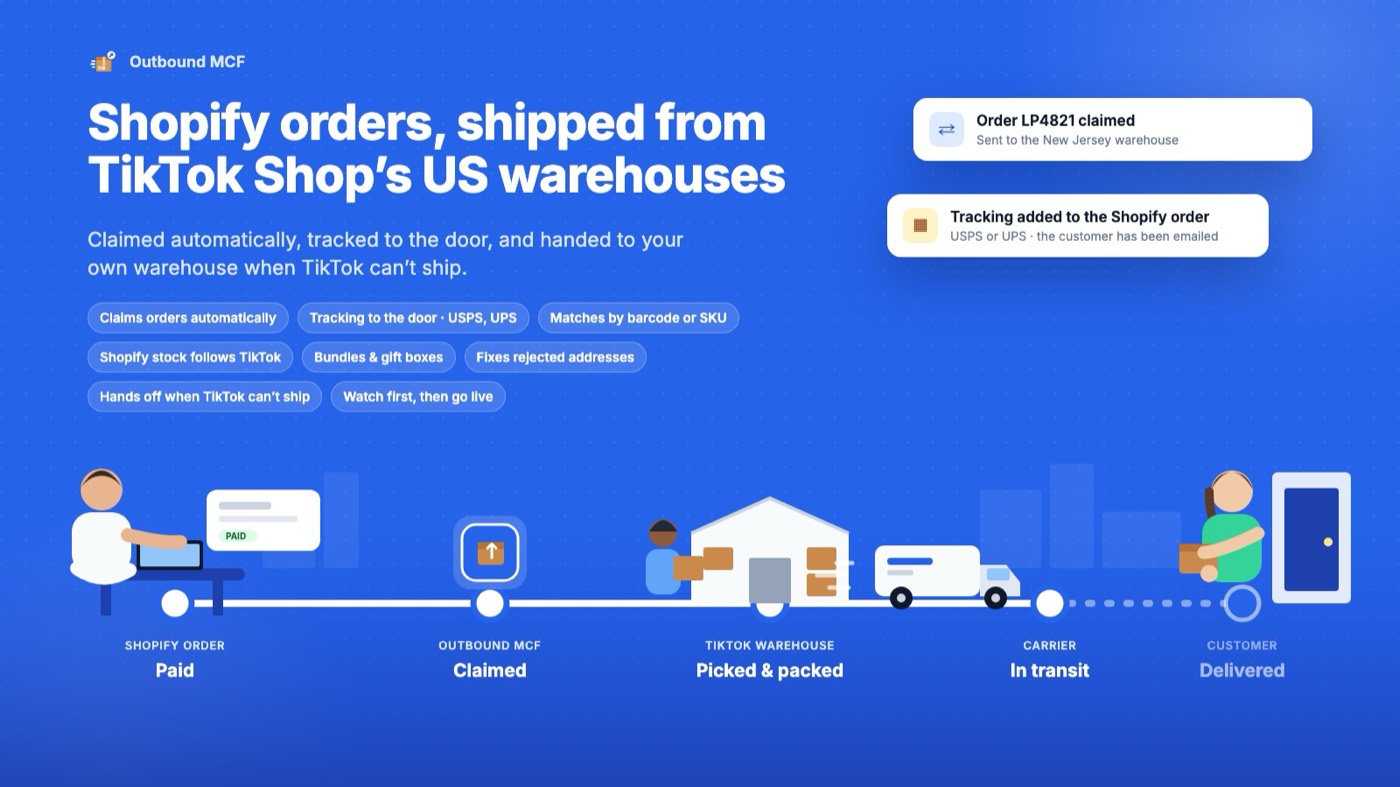
Outbound MCF sends your Shopify orders to TikTok Shop's US fulfillment centers through Multi-Channel Fulfillment, so the stock you already keep with TikTok ships your website orders too. One stock pool can cut 3PL costs and stockouts.
One stock pool for TikTok Shop and Shopify
Outbound MCF sits between your Shopify store and TikTok's Multi-Channel Fulfillment API. It watches orders, decides which ones TikTok can ship, and keeps both sides informed until the parcel is delivered.
Order is paid
A customer orders on your Shopify store, from any sales channel: online store, POS, social, marketplace.
Outbound MCF claims it
The app checks the address, the products and the warehouse stock, holds the order in Shopify, and creates it with TikTok.
TikTok ships it
Your Fulfilled by TikTok warehouse picks, packs and hands the parcel to USPS or UPS.
Shopify is updated
Tracking and delivery appear on the Shopify order, the customer is emailed, and inventory follows the warehouse.
Fulfillment that explains itself
Everything the app does, grouped by the screen you'll find it on. Each problem it finds comes with a plain-word reason and the next step.
Orders
- Claims eligible paid orders automatically
- Holds the order in Shopify while TikTok ships it
- Tabs that follow the parcel: sent, shipped, in transit, delivered
- Per-line claiming when only part of an order can ship (Pro)
- Bulk claim, release and retry
Tracking
- USPS and UPS tracking written to the Shopify order
- Delivery updates and the customer email Shopify sends
- Carrier checkpoints on the order (Pro)
- Lost or stalled parcels flagged with what to do
Products
- Matches by barcode, then SKU
- Shows each product's TikTok match and warehouse stock
- Pause a product so Shopify shows zero
- CSV import of matches and a stock check (Growth)
Bundles and gift boxes
- Define what ships in each set
- Ships as its parts from one warehouse
- Shows which warehouses can pack a complete set
- Up to 10 bundles on Starter, unlimited from Growth
Inventory
- Shopify stock follows TikTok warehouse stock
- A dedicated “TikTok MCF” location in Shopify
- A safety buffer so you never oversell the last units
- Low-stock alerts before a product runs dry
Handoff
- Orders TikTok can't ship go to your own warehouse automatically
- Non-US addresses never wait
- Rejected addresses can be fixed in place and retried
- Nothing is billed for handed-off orders
Alerts and digests
- Plain-word alerts for rejected addresses, lost parcels and low stock
- Daily and weekly email digest (Growth)
- Home screen groups what needs a person by what to do
Reports
- Claims, ships and handoffs over time
- Reasons orders were skipped
- Delivery times by warehouse and carrier
- CSV export; 90 days to 1 year of history by plan
Modes and safety
- Observe mode: records what it would do, sends nothing
- Live mode when you're ready, switchable any time
- Try with demo data on a development store
- Every write is idempotent and retried
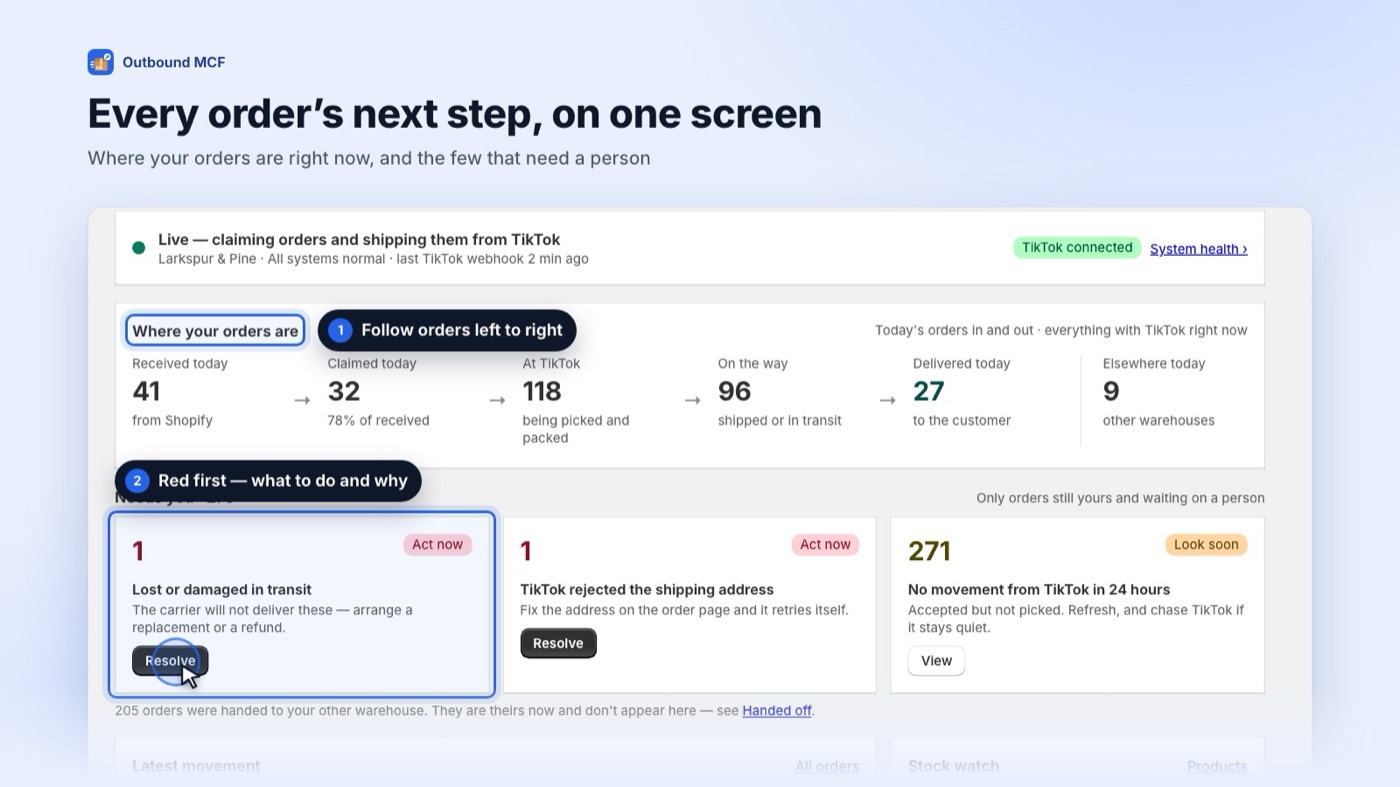
See only the orders that need you
Orders that need a person are grouped by what to do, each with a plain-word reason and a one-click action. Everything else ships on its own. Today's claims, ships and handoffs are one glance away.
Watch first, then go live
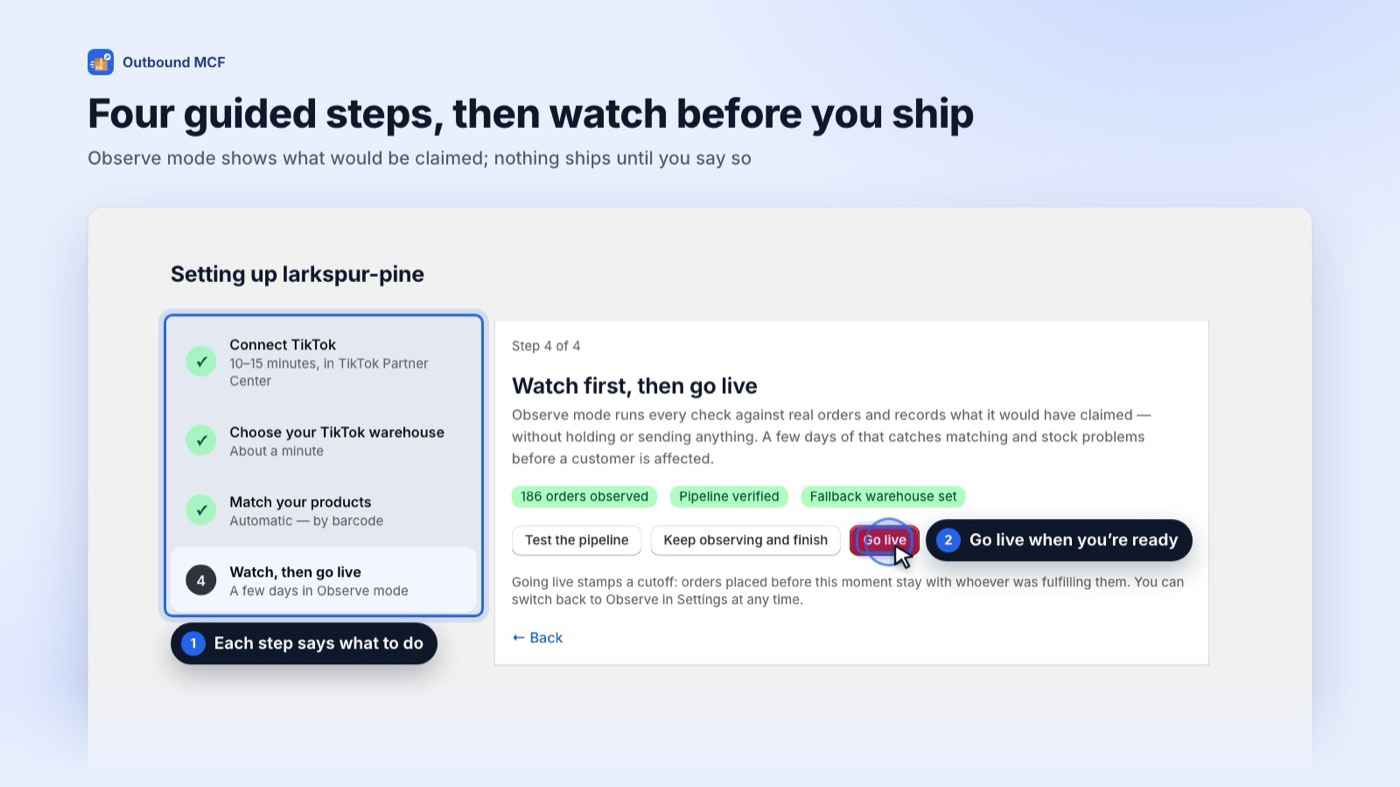
A four-step setup connects your TikTok Shop account, creates the TikTok MCF location, matches your products and lets you watch in Observe mode before anything is sent. Go live when the numbers look right.
Follow every parcel to the door
Tabs follow the parcel: sent to TikTok, shipped, in transit, delivered, handed off. Search by order, TikTok order or tracking number. Claim a skipped order with one click.
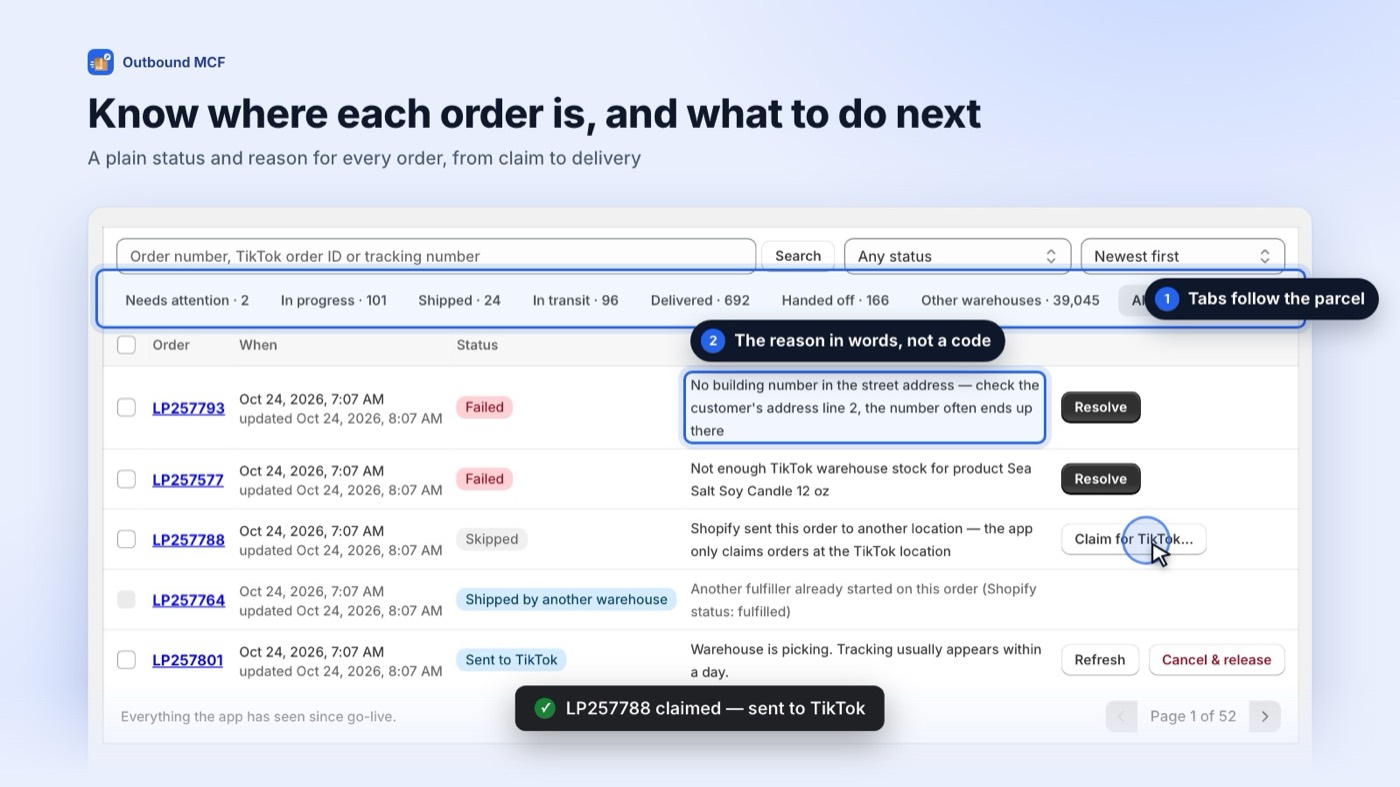
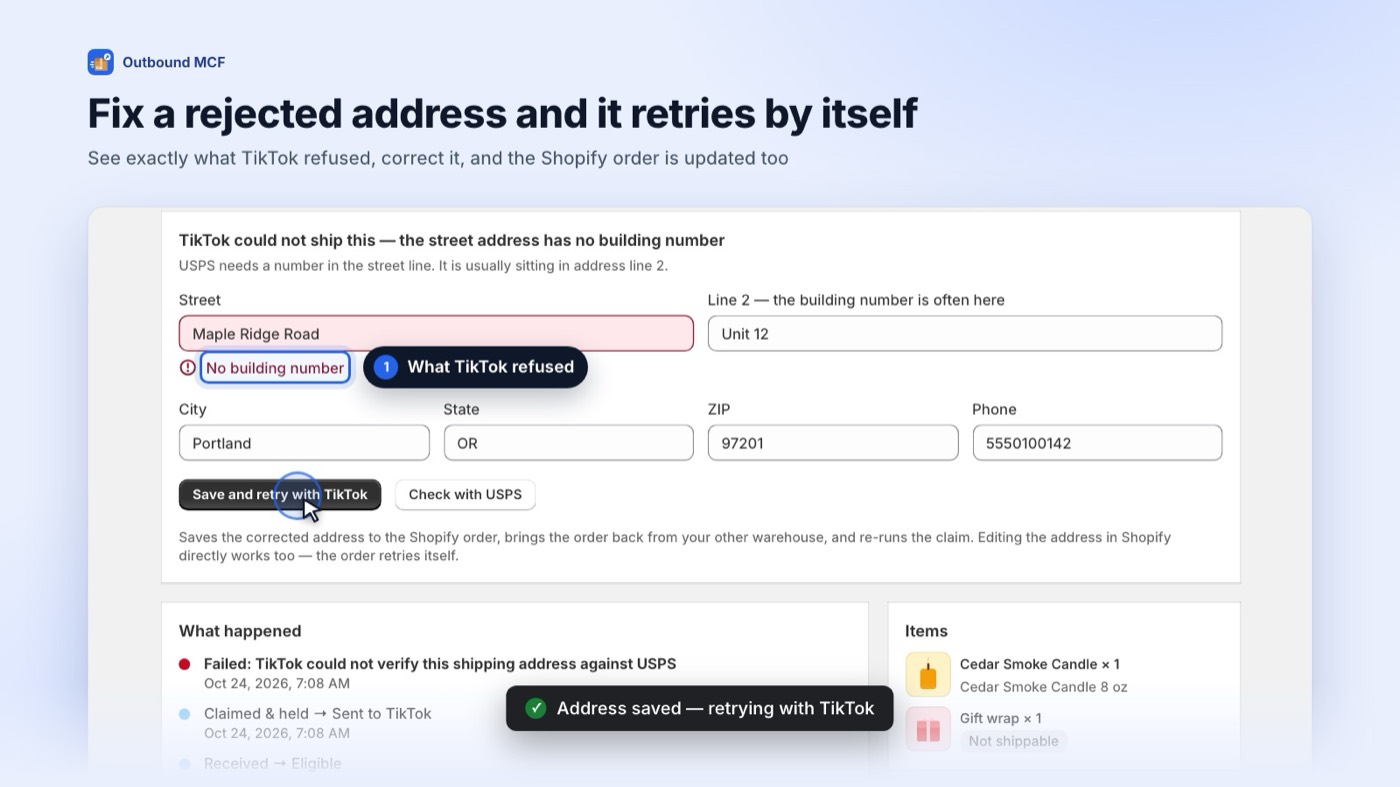
Rejected addresses, fixed in place
When TikTok refuses an address, for example a missing building number, the app says so in plain words and gives you the form to correct it and retry. No codes to look up.
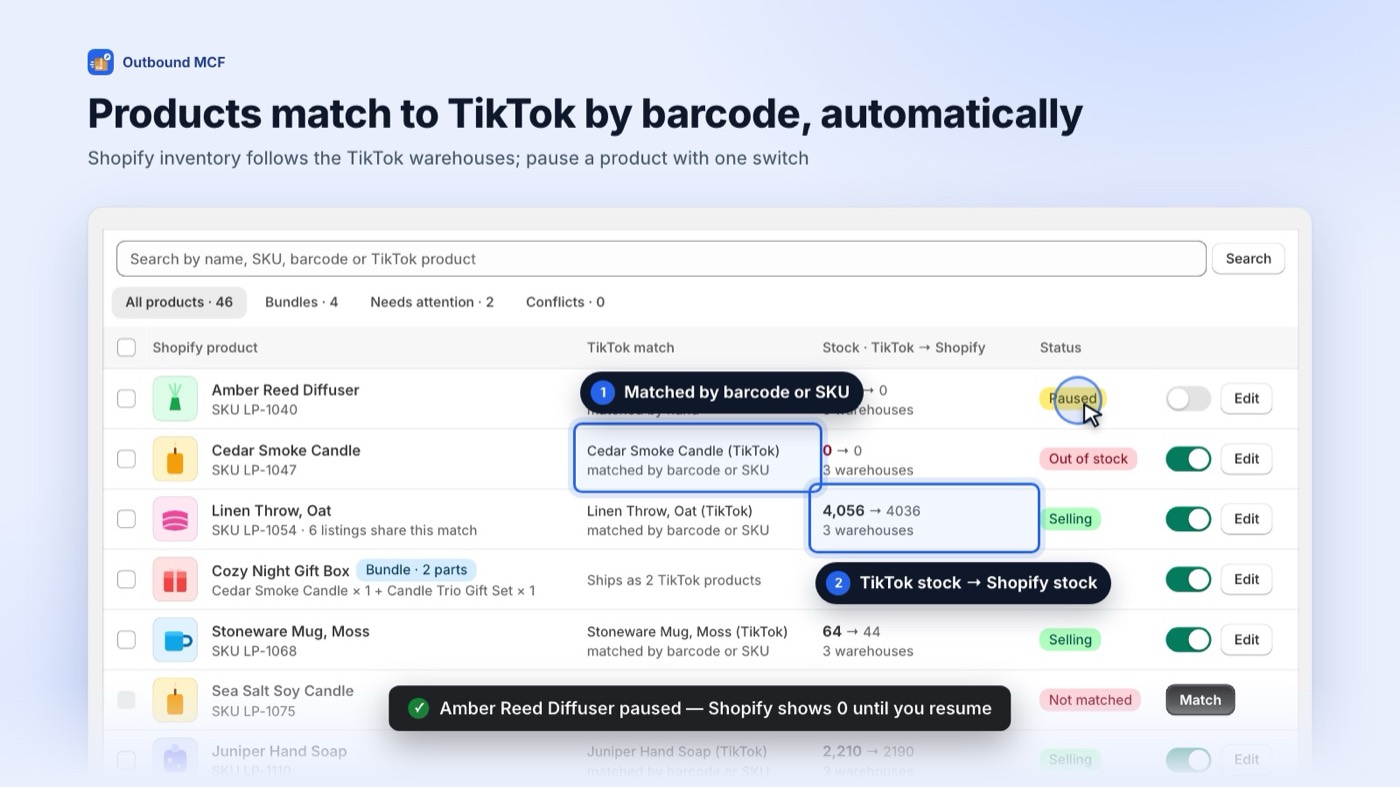
Matched by barcode or SKU
See each product's TikTok match and warehouse stock. Pause a product at any time so Shopify shows zero. Import matches by CSV and run a stock check on the Growth plan.
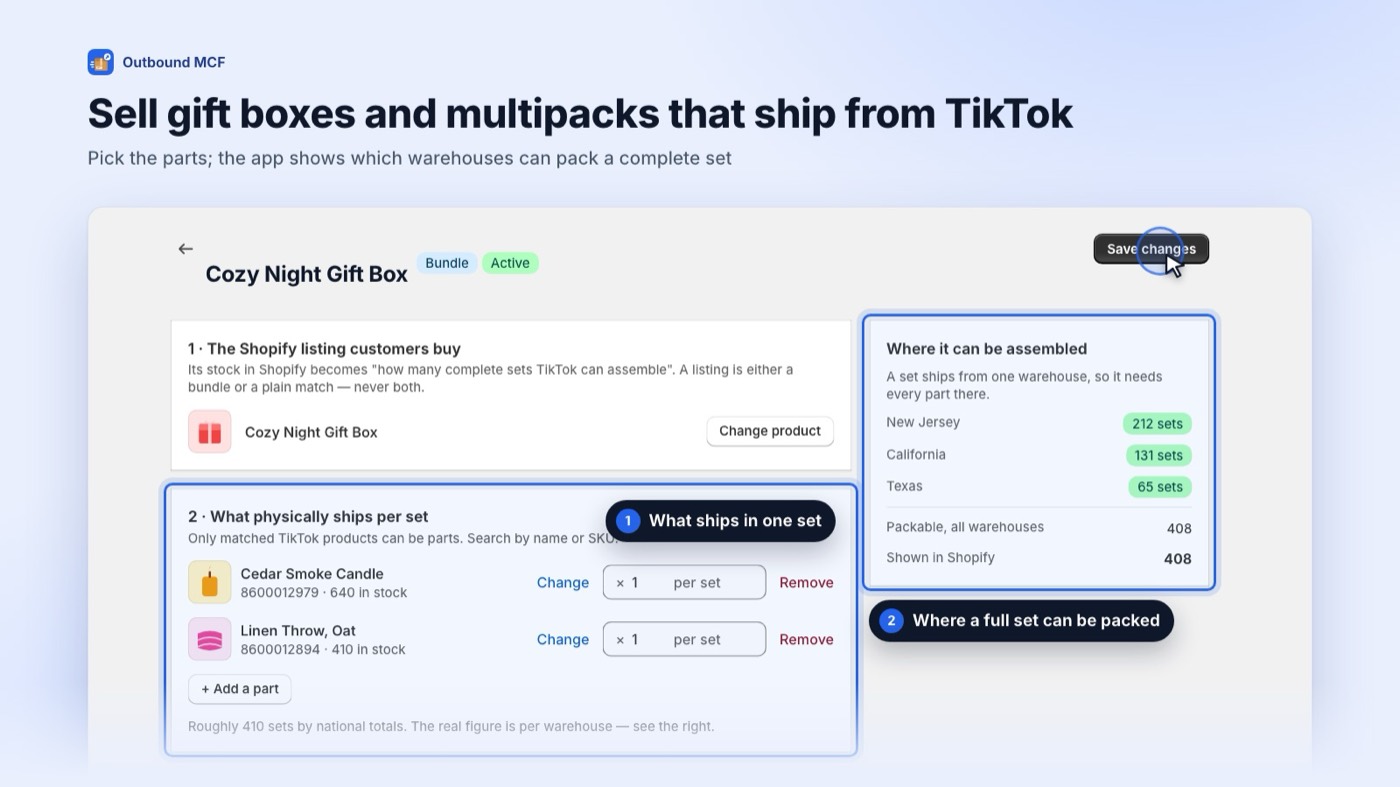
Gift boxes, packed complete
Define what ships in each set and see which warehouses can pack a complete one. A bundle ships as its parts from one warehouse, so the customer gets one parcel.
Connected in about 15 minutes
- 10 to 15 minutes
Connect TikTok Shop
Create a small app in TikTok Partner Center and paste its keys and the redirect URL the screen shows you. The onboarding walks through every click.
- 1 minute
Create the TikTok MCF location
One click adds a location in Shopify that mirrors your TikTok warehouse stock.
- A few minutes
Match products
Barcodes match automatically, SKUs next. Review anything left over, set up bundles if you have them.
- When you're ready
Observe, then go live
Observe mode shows which orders would ship and why others wouldn't. Switch to Live from Settings and place a demo order to watch it travel.
What you need before you install
- A TikTok Shop US seller account enrolled in Fulfilled by TikTok, with stock in TikTok's US warehouses and Multi-Channel Fulfillment enabled.
- US shipping addresses. Orders to other countries go to your own warehouse automatically.
- About 10 to 15 minutes to create the small app in TikTok Partner Center during setup.
- Any Shopify plan. The Online Store channel is not required; the app works on orders from any channel.
Pay only for orders that ship
Billed per shipped order. Cancelled, failed or handed-off orders are never billed. Every paid plan has a 7-day free trial, billed through Shopify.
Free
- 25 shipped orders a month
- Then new orders go to your own warehouse
- Automatic claiming and tracking
- Product matching
Starter
- 300 orders, then $0.08 each
- Up to 10 bundles
- Bulk actions
- 90 days of reports
Growth
- 1,500 orders, then $0.05 each
- Unlimited bundles
- CSV import and stock check
- Daily and weekly digest
- 6 months of reports
Pro
- 6,000 orders, then $0.03 each
- Carrier checkpoints
- Per-line claiming
- 6 months of reports
| What's included | Free | Starter | Growth | Pro |
|---|---|---|---|---|
| Shipped orders a month | 25 | 300 | 1,500 | 6,000 |
| Extra orders | Go to your own warehouse | $0.08 each | $0.05 each | $0.03 each |
| Bundles | — | Up to 10 | Unlimited | Unlimited |
| Bulk actions | — | Yes | Yes | Yes |
| CSV import and stock check | — | — | Yes | Yes |
| Daily and weekly digest | — | — | Yes | Yes |
| Carrier checkpoints, per-line claiming | — | — | — | Yes |
| Report history | 30 days | 90 days | 6 months | 6 months |
| TikTok accounts per store | 1 | 1 | 1 | 1 |
Prices in USD. Enterprise: any volume, a year of reports and a dedicated contact, by arrangement.
Only what a parcel needs
To ship an order, Outbound MCF sends the recipient's name, phone, email and address to TikTok Shop under your own seller agreement, together with the order number and line items. It does not touch payment details, browsing data or your wider customer list.
A snapshot of the recipient details stays on the order so failed handoffs can be retried, and is deleted automatically 90 days after the order closes. Raw webhook payloads go after 15 days; backups are encrypted and rotated after 14. Uninstalling deletes everything for your store. Read the privacy policy and terms.
Never loses an order
- Every write to TikTok and Shopify is idempotent
- Retries with backoff when either side is down
- Anything TikTok can't ship is handed to you, never dropped
Encrypted and logged
- TLS in transit, encryption at rest and in backups
- Reads of recipient details through the app are logged
- 72-hour breach notification to affected merchants
Shopify-compliant
- Mandatory privacy webhooks honoured
- Shopify managed pricing; billing never blocks an order
- Protected customer data handled to Shopify's requirements
Do I need my own TikTok developer account?
You create a small app in TikTok Partner Center during setup. It takes about 10 to 15 minutes, and the onboarding screen shows each step, including the exact redirect and webhook URLs to paste.
Which orders does it ship?
Paid Shopify orders to US addresses whose products are matched and in stock at your TikTok warehouses. Anything else stays with your own warehouse, with the reason shown on the order.
Can I try it without sending real orders?
Yes. Observe mode records which orders the app would ship without sending anything to TikTok. On a development store, “Try with demo data” simulates a warehouse end to end.
What happens if TikTok can't ship an order?
The app tells you why in plain words. Address problems can be fixed and retried; stock problems wait for stock or hand off; anything else goes to your own warehouse so the customer isn't kept waiting.
Does it work with bundles and gift boxes?
Yes. Define what ships in each set and the app sends the parts to one warehouse that can pack the complete set.
How does inventory stay correct?
Shopify's TikTok MCF location follows the warehouse stock TikTok reports, minus a safety buffer you can set. Pausing a product shows zero in Shopify immediately.
What am I billed for?
Shipped orders only, on your Shopify invoice. Cancelled, failed or handed-off orders are never billed, and usage never exceeds the cap you approve.
Can I connect more than one TikTok Shop?
One TikTok account per Shopify store on every plan. For several stores, install the app on each.
What customer data do you keep?
Only the recipient details needed to ship each order, deleted automatically 90 days after the order closes. See the privacy policy.
Ship Shopify orders from the stock you already have
Outbound MCF is launching soon on the Shopify App Store. Ask for early access and we'll help you connect.